
🎸 Introduction: A Mosh Pit in Your Living Room
If you’ve ever been to a Metallica concert - especially on the M72 tour - you already know the moment I’m about to talk about.
Near the end of the show, when everyone’s throat is cooked from yelling “MASTER!” and the energy in the arena is peaking, giant Metallica beach balls drop from the ceiling. These things are massive - black and yellow, covered in band iconography, and just begging for chaos. They fall into the pit like meteor strikes, and the crowd absolutely loses its mind. People jump, punch, crash into each other, and bounce these things around like some wild, metal-fueled beach party.
It’s one of those moments that hits you right in the chest - pure joy, pure noise, pure energy.
And I wanted that feeling - in my own house.
So I built The Pit: a VisionOS physics playground where Metallica-themed balls rain down inside your real room, rebound off your furniture, smack your walls, and react to your actual hands. It’s loud, goofy, technical, and probably the most fun I’ve had building anything in spatial computing.
I’d been deep in day‑to‑day app work, and I needed a break - something different, something big, something that reminded me why playing with new tech still feels like discovering a new riff. This project hit that reset button.
Powered by:
- SwiftUI for UI and state
- RealityKit for rendering + physics
- ARKit for scene understanding
- VisionOS 2.0 for hand tracking and immersive spaces
…it became a surprisingly solid VisionOS tech demo wrapped inside a stadium‑show moment.
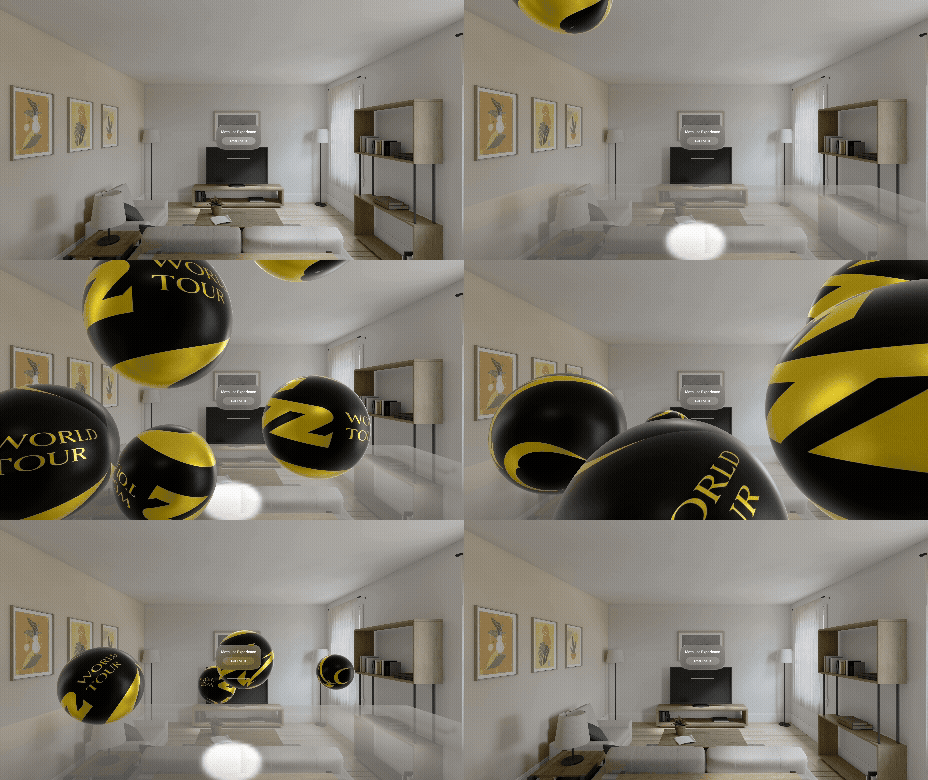
1. Setting Up the Immersive Space
Once I had the concept, I needed the stage - the digital arena where the chaos would unfold. And before I could drop a single ball, VisionOS needed to be in the right mood. That meant setting up an immersive space that could actually carry the weight of everything I wanted to throw at it: physics bodies flying around, real‑world collisions, hand tracking, and the kind of rapid‑fire updates that would make a normal windowed app fall apart. This section became the foundation - the part where the headset stops behaving like a screen and starts behaving like a venue.
🎛 App Structure: The Calm Before the Storm
A simple SwiftUI WindowGroup gives the user one job:
Press the big button that says “Enter The Pit.”
Inside the app file:
ImmersiveSpace(id: "BallSpace") {
    BallView()
}
.immersionStyle(selection: .constant(.mixed), in: .mixed)
.upperLimbVisibility(.hidden)
Instead of juggling multiple views or awkward transitions, ImmersiveSpace becomes the arena where all the chaos lives. I hide the user’s arms so the floating yellow palm spheres feel intentional instead of distracting, and by running in mixed immersion, the physics system can slam Metallica balls into your actual room - furniture, walls, and all.
🚪 Managing State Transitions
VisionOS can double-trigger immersive spaces if you’re not careful.
if !isPitOpen {
    isPitOpen = true
    openImmersiveSpace(id: "BallSpace")
}
Without this guard, rapid button presses or async timing issues can try to open multiple spaces, which crashes the experience.
2. Physics Foundation: Making the Balls Actually Bounce
With the stage set, it was time to bring the stars of the show to life. The balls couldn’t just fall - they needed weight, attitude, and that satisfying rebound you feel in the pit when one slams into your shoulder. This whole section is where the physics finally woke up and the Metallica energy started to show.
🎨 Making Metallica Balls
I built a custom PBR material with:
- An M72-style texture
- A metallic finish
- Small roughness tweaks
- Realistic physics
var physicsBody = PhysicsBodyComponent(
    massProperties: .init(mass: 2.0),
    material: .generate(friction: 0.5, restitution: 0.8),
    mode: .dynamic
)
They bounce, they roll, they smack into furniture - everything you want. And the fun part is how easily you can tweak this to match your own vision: bump up the mass to make them hit harder, drop the restitution and they thud into your couch like sandbags instead of beach balls, swap in your own textures for custom themes, or even crank friction to make them skid across your floor like someone just booted them off the rail. This little section of code becomes your playground for shaping the energy and attitude of every ball in the pit.
🧩 Collision Categories: Making Reality Behave
Without categories, everything fell through everything.
enum CollisionCategory: UInt32 {
    case ball = 1
    case environment = 2
    case hand = 4
    case all = 0xFFFFFFFF
}
Group + mask determines who can collide with who. In RealityKit, the group describes what category an entity belongs to, and the mask describes which other categories it’s allowed to interact with. When both sides agree - meaning a ball’s mask includes the environment, and the environment’s mask includes the ball - collisions are evaluated. Before setting this up, objects ignored each other completely, but once the categories and masks were paired correctly, the physics engine finally understood the rules of the arena and everything snapped together.
⚡ Preventing Tunneling
Fast balls were ghosting through surfaces. The fix:
physicsBody.isContinuousCollisionDetectionEnabled = true
And here’s why this works: RealityKit’s physics engine normally checks collisions at discrete intervals, which is usually fine - until something moves fast enough to slip completely between those checks. That’s tunneling. By enabling continuous collision detection, RealityKit traces the entire path of the object between frames instead of sampling a single point. So even if the ball is screaming through your space like it’s trying to reach the rail before everyone else, the engine still catches the collision and keeps it from phasing through your floor or furniture.
3. Scene Reconstruction: Your Room Becomes the Arena
Once physics felt good, I wanted the environment to matter. Not a fake floor, not a sandbox - your actual house becoming part of the concert. This is the moment the project shifted from a demo to something legitimately wild.
🧱 Why Scene Reconstruction?
In the simulator you get a fake floor. On the device, you want:
- Your couch
- Your coffee table
- Your walls
- Random clutter you definitely meant to pick up
…all turned into collision bodies.
🛠 Mesh Processing
var collision = CollisionComponent(shapes: [shape])
collision.filter = CollisionFilter(
    group: CollisionGroup(rawValue: CollisionCategory.environment.rawValue),
    mask: CollisionGroup(rawValue: CollisionCategory.all.rawValue)
)
meshEntity.collision = collision
meshEntity.physicsBody = PhysicsBodyComponent(
    massProperties: .init(mass: 0.0),
    material: .generate(friction: 0.8, restitution: 0.3),
    mode: .static
)
Your room becomes part of the show - not just as background scenery, but as an active piece of the physics puzzle. RealityKit turns every scanned surface into something the balls can collide with: your couch becomes a soft barrier, your coffee table becomes a launchpad, and that random chair you swore you were going to move last week suddenly becomes part of the pit geometry. Once the mesh is processed, the whole experience feels less like a tech demo and more like a live, chaotic event unfolding inside your actual space.
🕵️ Scanning UX
Before balls drop, a 3‑second environment scan runs. It gives ARKit enough time to processed enough mesh data. Without this buffer, early balls would drop into an incomplete floor and ghost through gaps that hadn’t been reconstructed yet.
4. Hand Tracking: Punch the Balls!
After the room joined the concert, the next question was obvious: can I punch these things? And yeah - that turned into its own journey.
🥊 The Missteps
I tried:
- Invisible spheres - seemed clever at first, but they had no real presence and the collisions felt like trying to high‑five a ghost. Zero feedback, zero fun.
- Full hand meshes - impressive visually, but the orientation drifted like a drunk roadie stumbling across the stage. Lots of wobble, unpredictable contact points, and way too much overhead for what I needed - even though I still like this concept and plan to revisit it when I have more time to push it further.
- Bright yellow palm spheres - simple, obvious, and instantly reliable. Easy to see, easy to debug, and they smacked the balls around like a crowd‑surfer bouncing across the rail. Perfect.
Sometimes the simplest path wins.
✋ Tracking Session
let session = SpatialTrackingSession()
let configuration = SpatialTrackingSession.Configuration(tracking: [.hand])
_ = await session.run(configuration)
✋ Hand Anchoring
let handAnchor = AnchorEntity(.hand(chirality, location: .palm),
                              trackingMode: .continuous)
let handModel = ModelEntity(
    mesh: .generateSphere(radius: 0.05),
    materials: [yellowMaterial]
)
let physicsBody = PhysicsBodyComponent(
    massProperties: .init(mass: 0.1),
    mode: .kinematic
)
handModel.components.set(physicsBody)
Kinematic hands control objects without being pushed around.
5. RealityKit Best Practices I Picked Up
This whole project was one long “oh wow, that’s how that works” experience. A few lessons stood out - the kind that make RealityKit feel less like a mysterious amp and more like gear you actually know how to dial in.
🌲 Keep a Single Root Entity
All physics children live under one parent. It keeps updates predictable, but more than that, it gives you a single place to reason about what’s happening in the scene. When everything hangs off a root entity, you can:
- Apply global transforms in one spot (move the whole pit, rotate it, reset it)
- Tear everything down cleanly by removing one subtree instead of chasing individual entities
It’s the spatial‑computing version of having a clear view hierarchy: when you come back to this project in six months, you’ll thank past‑you for not scattering entities all over the place.
🧩 Component Discipline
Use .components.set() consistently. RealityKit rewards you for treating components like clean, composable pieces of behavior instead of magical flags you set randomly.
By leaning into components, you can:
- Add or remove behavior at runtime (e.g., swap physics materials mid‑show)
- Keep entities lightweight and focused, instead of piling everything into one mega type
- Avoid weird half‑initialized states where some part of the physics or collision stack never got set
A nice mental model is: entities are nouns, components are adjectives. Ball entity, with physics, with collision, with visuals. When you stick to that pattern, it’s easier to debug and easier to evolve.
🌍 Lower Gravity for Drama
var physicsSimulation = PhysicsSimulationComponent()
physicsSimulation.gravity = [0, -2, 0]
Dropping gravity from Earth‑like values to something softer instantly changes the mood. Instead of balls slamming down and dying, they hang in the air a beat longer, bounce a few extra times, and feel more theatrical.
The key is to treat gravity as a creative dial, not a fixed constant. You’re not simulating reality - you’re staging a show.
🖥 Simulator vs Device
Use #if targetEnvironment(simulator) to provide a virtual floor and disable anything that depends on real‑world sensing. The simulator is still super useful for quick UI iterations and basic physics tuning, but it has no idea what your actual room looks like.
In The Pit, I kept two mental modes:
- Simulator mode - fake floor plane, no scene reconstruction, quick iteration on ball behavior
- Device mode - full ARKit session, mesh processing, real‑world collisions
That split lets you move fast without waiting on a headset for every small tweak, while still respecting the fact that spatial apps don’t fully make sense until they’re running in an actual space.
🐛 Debug with visible meshes
Before shipping, I uncommented the green mesh visualization to see exactly where ARKit thought surfaces were. This caught ceiling collisions, gaps in the floor, and furniture the system hadn’t fully processed.
6. Fun Touches
At this point, everything worked. But it didn’t feel like a Metallica moment yet. These were the final flourishes that gave The Pit its actual personality - the difference between rehearsal and a stadium show.
🎤 Staggered Drop
let row = Float(ballCount / 4)
let col = Float(ballCount % 4)
let x = (col - 1.5) * 0.8
let z = -2.0 + (row - 1.0) * 0.8
It feels like a lighting cue.
👆 Tap to Spawn
Spatial tap gesture = endless chaos - and it got me thinking how wild it would be to layer in a spatial video playback here, creating a fully immersive moment where the balls drop during a captured concert scene.
7. Challenges & Solutions
Like any good concert, something always goes sideways. Gear cuts out, a cable gets kicked loose, someone in the pit wipes out spectacularly - chaos is part of the charm. The same thing happened here. A few issues popped up that tried to throw the whole experience off‑beat, from balls clipping through the floor to hand anchors behaving like they were on their own tour schedule. These were the troublemakers that tried to ruin the encore - and how I kept the show going strong.
⚠️ Balls Falling Through the Floor
This one showed up early and loudly. Every time a ball dropped with enough speed, it would occasionally clip straight through the reconstructed floor like the laws of physics were taking a coffee break. The root cause was twofold: missing collision category alignment and the engine not checking collisions frequently enough for fast‑moving objects. Once I wired up proper collision filters and enabled continuous collision detection, the balls finally respected the floor. Suddenly every bounce, roll, and chaotic ricochet behaved the way it should - predictable for the engine, but still wild for the player.
⚠️ Hand Tracking Chaos
Hand tracking was its own backstage meltdown. The first attempts were all over the place: invisible spheres you couldn’t aim, full hand meshes that rotated like they were on a completely different beat, and unpredictable collisions that felt mushy or delayed. The breakthrough came when I switched to bright yellow palm spheres with kinematic bodies. They tracked cleanly, hit consistently, and gave the whole experience a punchy, arcade‑like feel. It wasn’t the most realistic approach, but it was the most fun - and sometimes that’s the only metric that matters.
⚠️ Missing Permissions
This one felt like forgetting to plug in an amp before the show. Without the right usage descriptions, VisionOS simply refused to run parts of the experience that relied on world sensing and hand tracking. Adding NSWorldSensingUsageDescription and NSHandsTrackingUsageDescription to the Info.plist instantly fixed it. It’s not glamorous, but these keys are the backstage passes that let VisionOS access the hardware needed to make the whole experience believable.
8. What I Learned
Every goofy side project teaches you something, but this one hit me right between the eyes. It reminded me why experimenting - even with something borderline ridiculous - is where the real learning happens. Each part of The Pit opened a different door in VisionOS, and a few lessons stuck with me hard:
🎭 Mixed immersion is way more fun than I expected
Seeing virtual balls collide with your actual couch does something to your brain. It creates this strange, delightful overlap between physical and digital that fully immersive or windowed apps just can’t replicate. There’s a punch of “is this really happening?” that makes the whole experience feel alive in a way no floating window ever could.
🧱 Collision categories are everything
Before setting proper groups and masks, the physics engine treated every entity like it didn’t exist - balls passed through furniture, hands didn’t register, and the entire experience felt haunted. Once collision categories were wired correctly, the whole simulation snapped into place. Suddenly the world felt solid, reliable, and capable of handling chaos.
🏠 Scene reconstruction turns your home into the arena
This was the moment things shifted from tech demo to full‑blown spectacle. When RealityKit starts treating your furniture, walls, and floor as active physics surfaces, the experience stops being an app and starts being an event. Your room becomes part of the performance - a place where digital objects behave like they actually belong there.
✋ Simplicity wins with hand interaction
I spent way too long trying to make hand meshes work when all I needed were bright, responsive spheres. They tracked cleanly, collided predictably, and gave the whole experience a fun arcade vibe. It was a good reminder that realism isn’t always the right target - sometimes the simplest, clearest interaction model creates the most joy.
🖥️ Simulator ≠ real device
This project reinforced that the simulator is great for speed but terrible for truth. Physics can be tuned in the simulator, but world reconstruction, lighting, occlusion, and hand tracking only make sense on the headset. The moment I switched to device testing, everything changed - for better and for stranger.
🎤 Final Thoughts
Building The Pit was pure joy - one of those rare projects that reminds you why you picked up coding in the first place. Loud idea, weird concept, and just technical enough to make you mutter “okay, that’s actually pretty cool” when it finally works.
It turned my living room into the final minutes of a Metallica encore, and honestly? I’m not sure I’ll ever look at my coffee table the same way again.
Every once in a while you need a project that kicks you out of the routine - something loud, unruly, and way too fun for a Tuesday afternoon. The Pit did that for me.
And yeah - I know I’ll be coming back to this one. There’s plenty left to tune, twist, and turn up once I get more time to push the chaos even further.
Next steps:
- Oriented hand meshes - I want to come back to this and build a proper, well‑oriented skeletal hand mesh that reacts naturally in the pit, instead of just palm spheres. It’s a bigger lift, but the payoff would be massive.
- Scoring and mechanics - a real game layer on top of the chaos, maybe tracking how many hits, volleys, or combos you rack up as the balls fly.
- Immersive spatial video mode - this is the one I’m most excited about. Imagine triggering a full‑screen spatial concert moment, and as the video hits the end‑of‑show cue, the balls begin falling inside the scene. A real Metallica encore mixed with live physics in your own room.
- Maybe a dodgeball mode - because why not turn the whole experience into a workout?
If you’re curious about VisionOS, projects like this will pull you in fast.